Posts

Showing posts with the label configuration

Making SublimePythonIDE Works on Windows

Image
Developing python code on Sublime Text using SublimePythonIDE package would make everything easier. This package highlights anything wrong inside your code. But when you installed it on Sublime whichi is run inside Windows, this package will not showing you any highlight. What you have to do is configuring Python interpreter. But, in very first you must have Python installed inside your Windows. You may read this on how install Python on Windows 10.
Lenovo G40-70 Wi-Fi Problem on Ubuntu [FIXED]

FYI, I use Lenovo G40-70 laptop for my daily "driver". Also I installed Ubuntu on it. Ubuntu 14.04 was chosen because of its long term support. Firstly I was happy when I installed Ubuntu. I personalize it. Yeah, I made my laptop to be "my self". But when I connected to wi-fi for a long time, the problem showed up. Internet connection was suspended, but the wi-fi icon was showing "connected" sign. I tried to disconnect and connect again to wi-fi, but it didn't work.

Another Way to Access Virtual Machine via http

Image
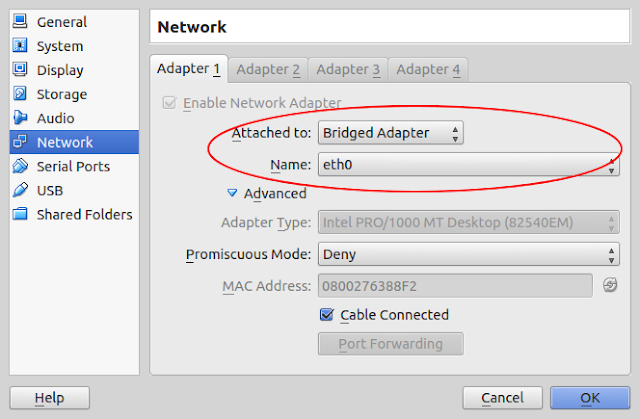
Previously, I posted how to access http from virtual machine here. In that post I said I use NAT connection. I found another way to connect it. It is simpler than previous configuration. You don't have to set port number or anything else. Just select type of connection Bridge Adapter and obtain IP address of virtual machine then write it down to your host machine. Now you could access virtual machine. What you can access? Anything that allowed by virtual machine, not only http.

How to Access HTTP to a Virtual Machine

Image
At my last work, I installed Postgrestats inside Ubuntu 12.04 LTS on VM. This web-based program, should be accessed by HTTP connection. It was successful when I tested it on localhost of my VM. But, I confused when I tried to access from my real OS (host computer of VM). I looked for the solution and ta da. It's work. What I did is explained step-by-step below. Note, I'm using Oracle VM Virtualbox .